
Scrine
Document AI that lives on your Mac — never the cloud.
Private, on-device intelligence for the documents you already have. No upload. No subscription. No telemetry. Just your files, your AI, your Mac.
Document AI that lives on your Mac — never the cloud.
Private, on-device intelligence for the documents you already have. No upload. No subscription. No telemetry. Just your files, your AI, your Mac.
Most "AI for documents" tools require you to upload your library to a server you don't own. Scrine flips that around. The intelligence comes to your files — not the other way.
The Scrine main process has no network entitlement. Verified by the operating system, not promised in a policy. Your data physically cannot leave the machine.
Local 4-bit MLX models — Qwen 2.5, Phi-4, Llama 3.1 — run on Apple Silicon faster than you'd expect. Works on a plane. Works in a SCIF. Works on your boat.
A cloud agent peers through narrow API windows. Scrine sits inside your Mac and reads everything you point it at — and remembers it.
Tools that turn your existing documents into something you can talk to. Swipe →
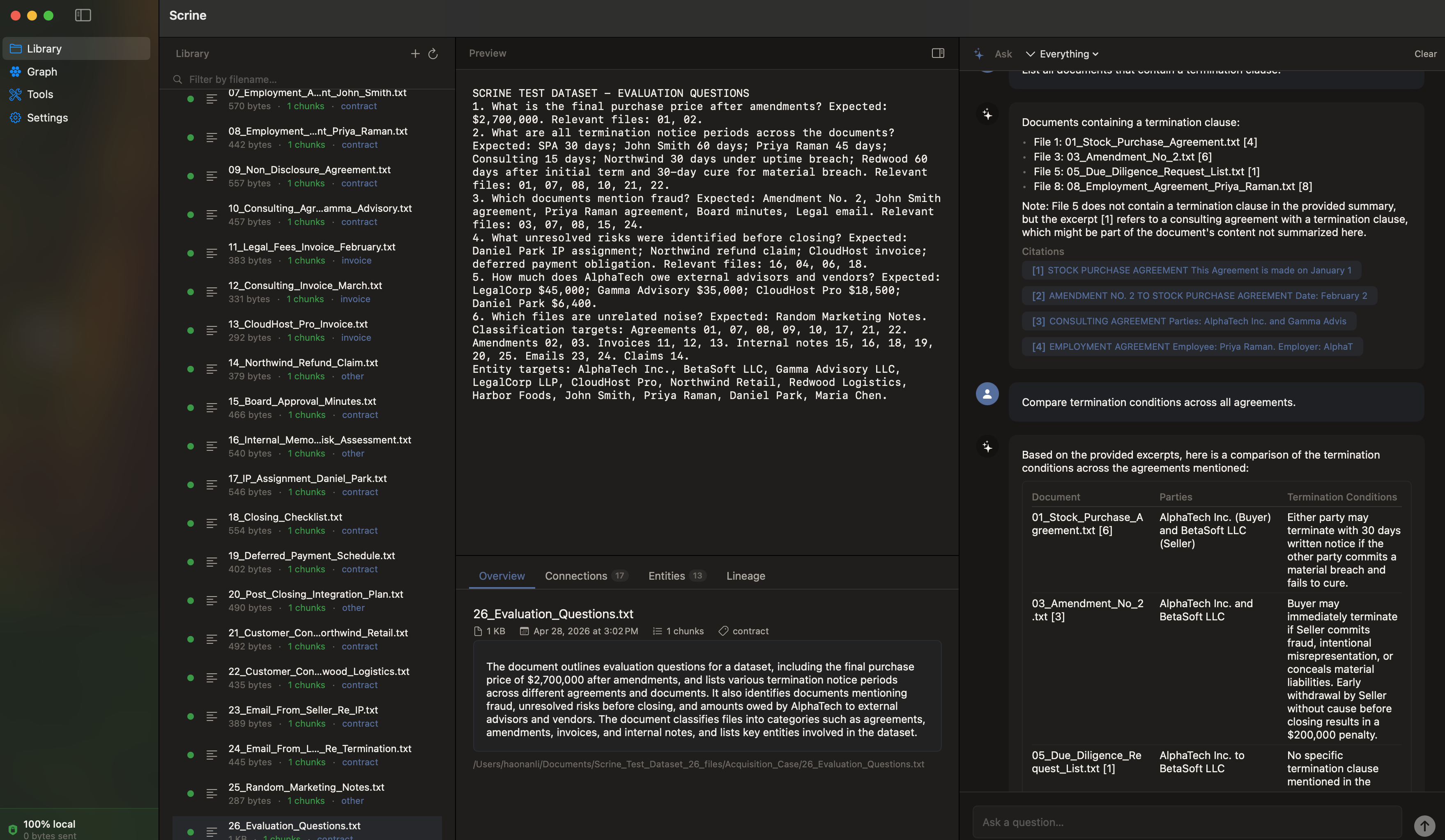
Natural-language Q&A over your full library. Every answer comes with citations — page numbers, file names, exact passages. No hallucinated quotes; every line is traceable.
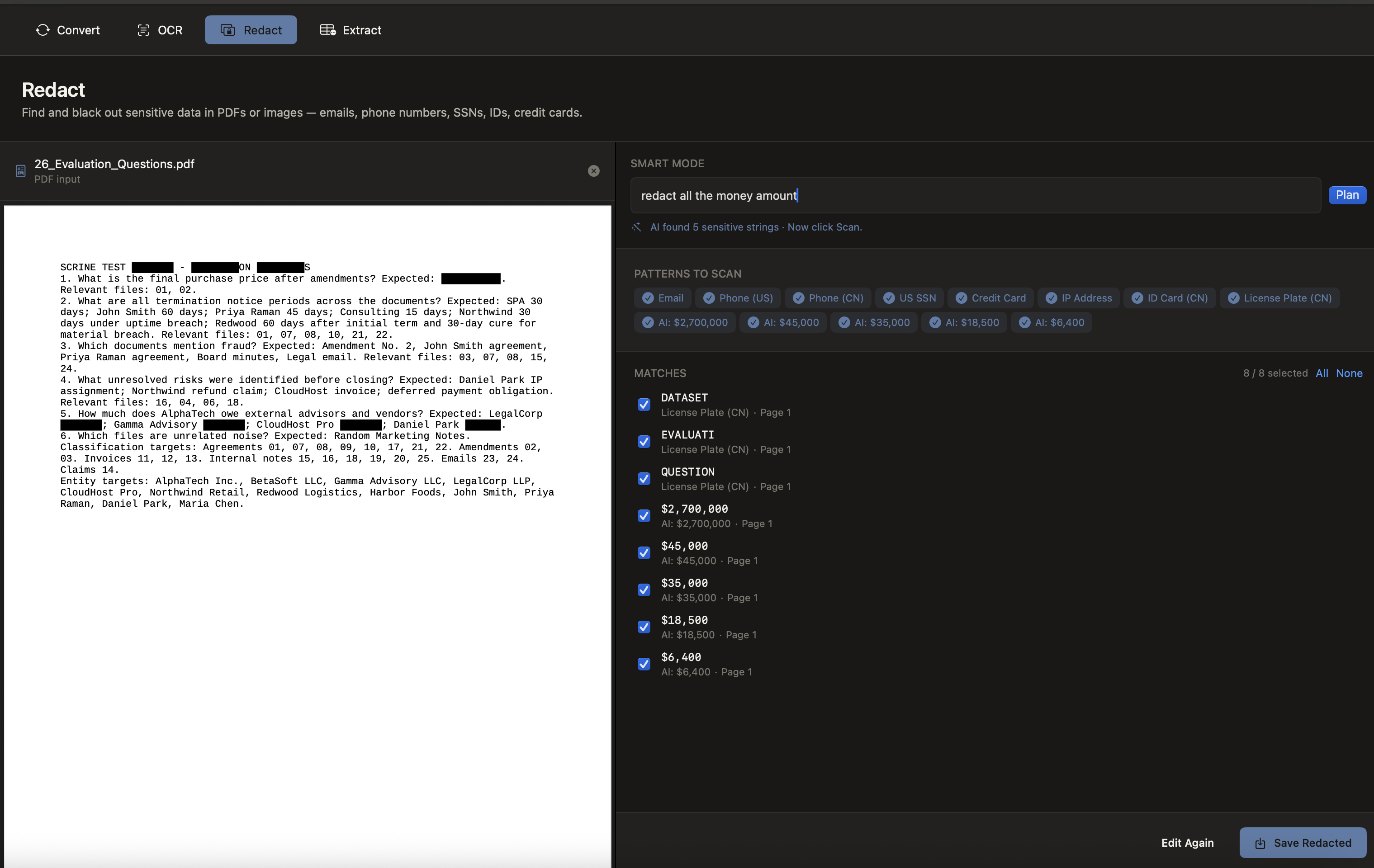
Auto-detect names, addresses, emails, phone numbers, and IDs across PDFs and black them out — actually deleting the text layer underneath, not just covering it. Court-ready.
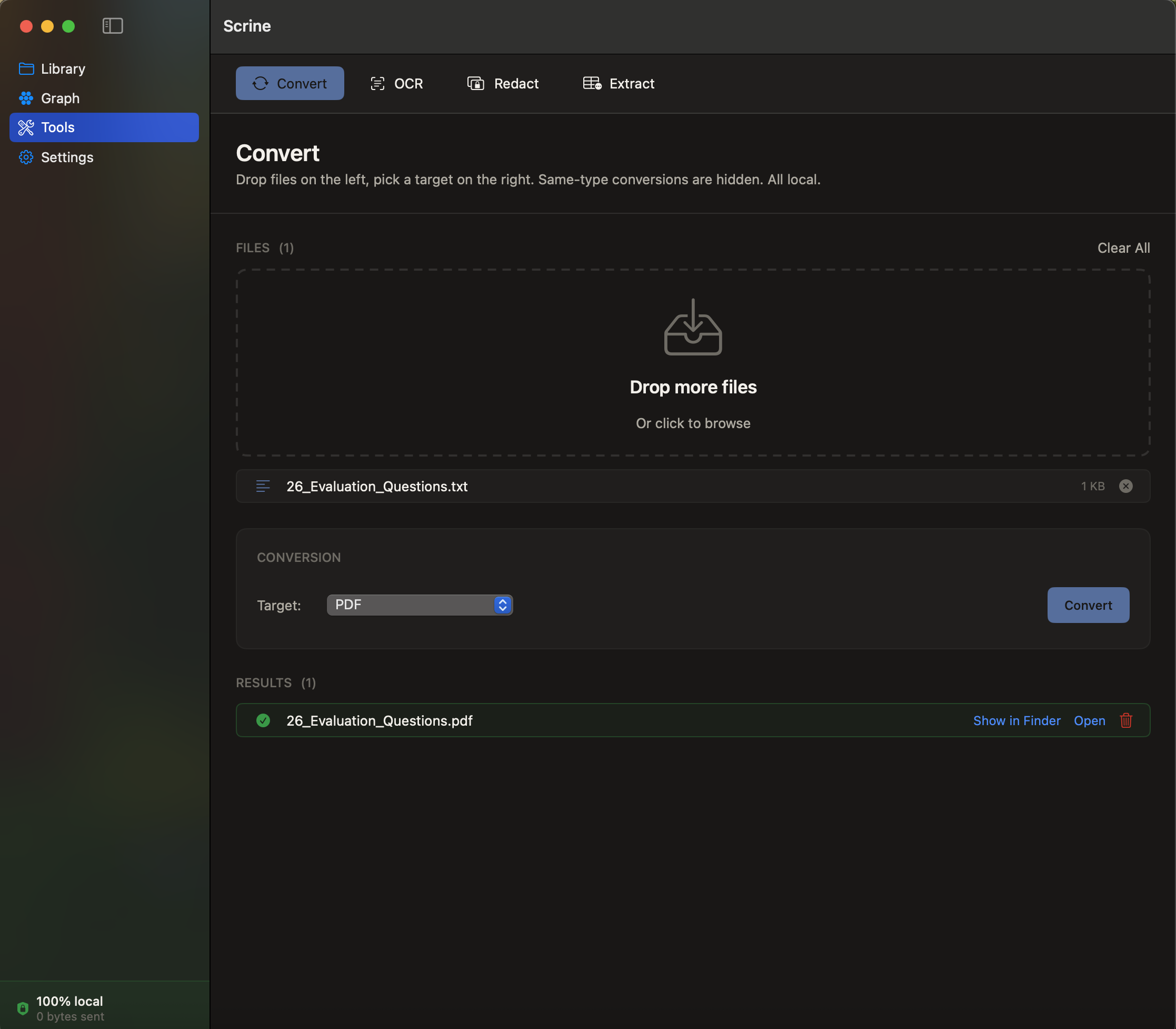
PDF, DOCX, TXT, MD, images — convert between formats without round-tripping through Adobe Online or Google Docs. Bundled offline conversion engine, fully sandboxed.
Most apps tell you they protect your data. Scrine is built so it physically can't leak it. Every claim below is testable from your own machine.
The Scrine executable is compiled without the
com.apple.security.network.client entitlement. macOS's sandbox enforces this at
the kernel — the process literally cannot open an outbound socket. Verifiable in Activity Monitor
or Little Snitch: zero outbound connections, ever.
Scrine collects nothing. Not "anonymized usage." Not "crash reports." Not an email at signup. The trial doesn't even ask for one. There is no data to sell because there is no data.
Every release is code-signed with our Developer ID, runs under hardened runtime, and is scanned by Apple's notary service before going live. Gatekeeper trusts it offline; the binary you download is the binary we built.
The LLMs run inside MLX on Apple Silicon. Weights download once into your local HuggingFace cache; inference happens entirely in your Mac's RAM. No API key, no remote call, no billed token.
Need this in writing? Enterprise customers can request source code audit access under NDA.
It's counter-intuitive — surely the bigger cloud model wins? Not for your documents. Here's why the people who care about their files pick Scrine:
Sees a few documents at a time through API windows. Each session starts fresh.
Indexes your entire library. Persistent memory. Connections across thousands of files.
Throttled by token budgets and rate limits. Pay per call.
One-time license. Run as much as your Mac can handle.
Sees what API operators choose to log. You're trusting a TOS.
The OS prevents network access. Trust by architecture, not policy.
Down when their servers are down.
Works offline. Forever.
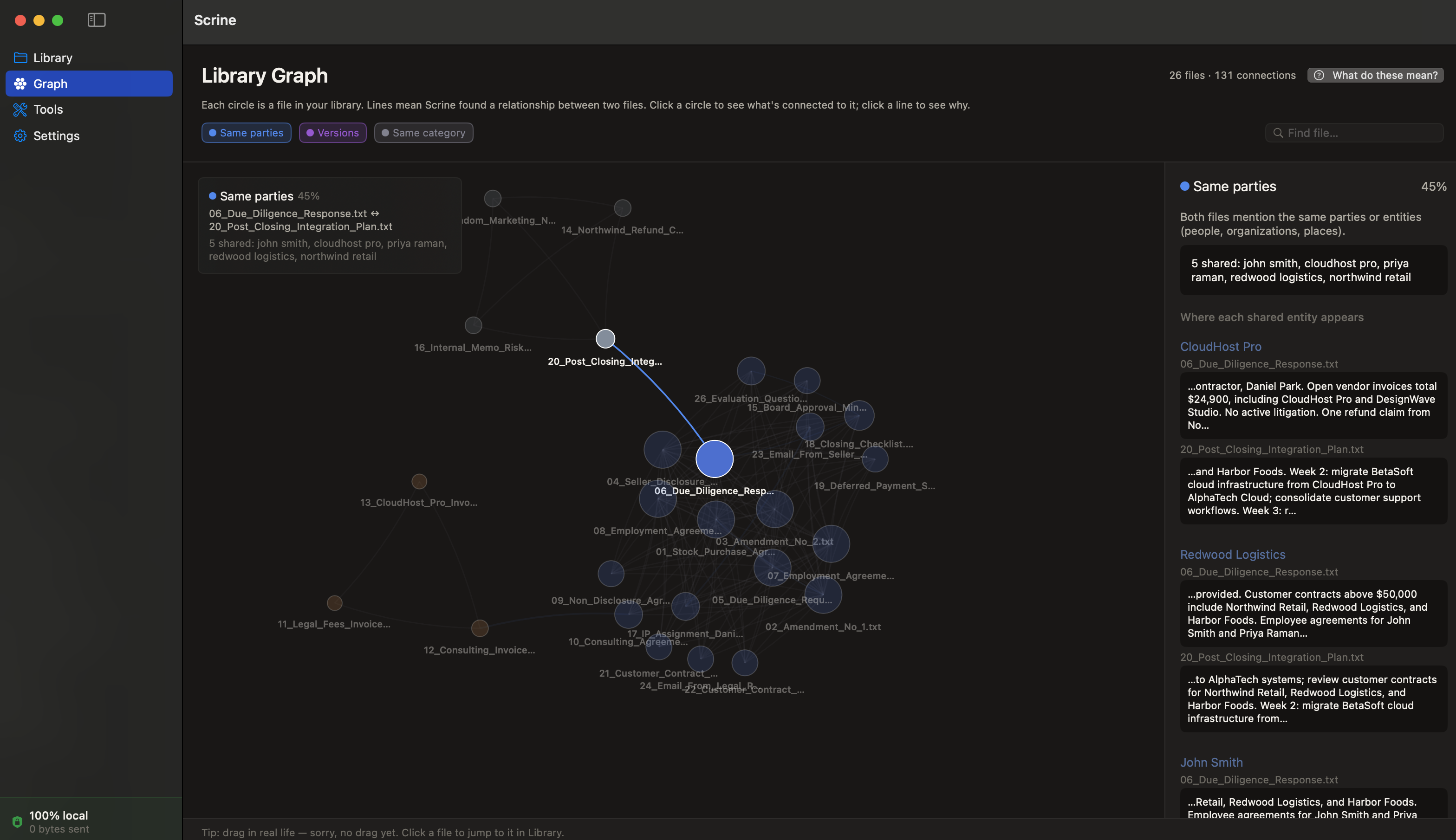
Scrine builds a knowledge graph as it indexes — discovering shared entities, version chains, and same-category relationships between your documents. The graph view shows it visually: which files reference each other, which clusters belong together, which documents are orphans waiting to be connected.
A cloud agent never sees this. Scrine does — and uses it to find better answers.
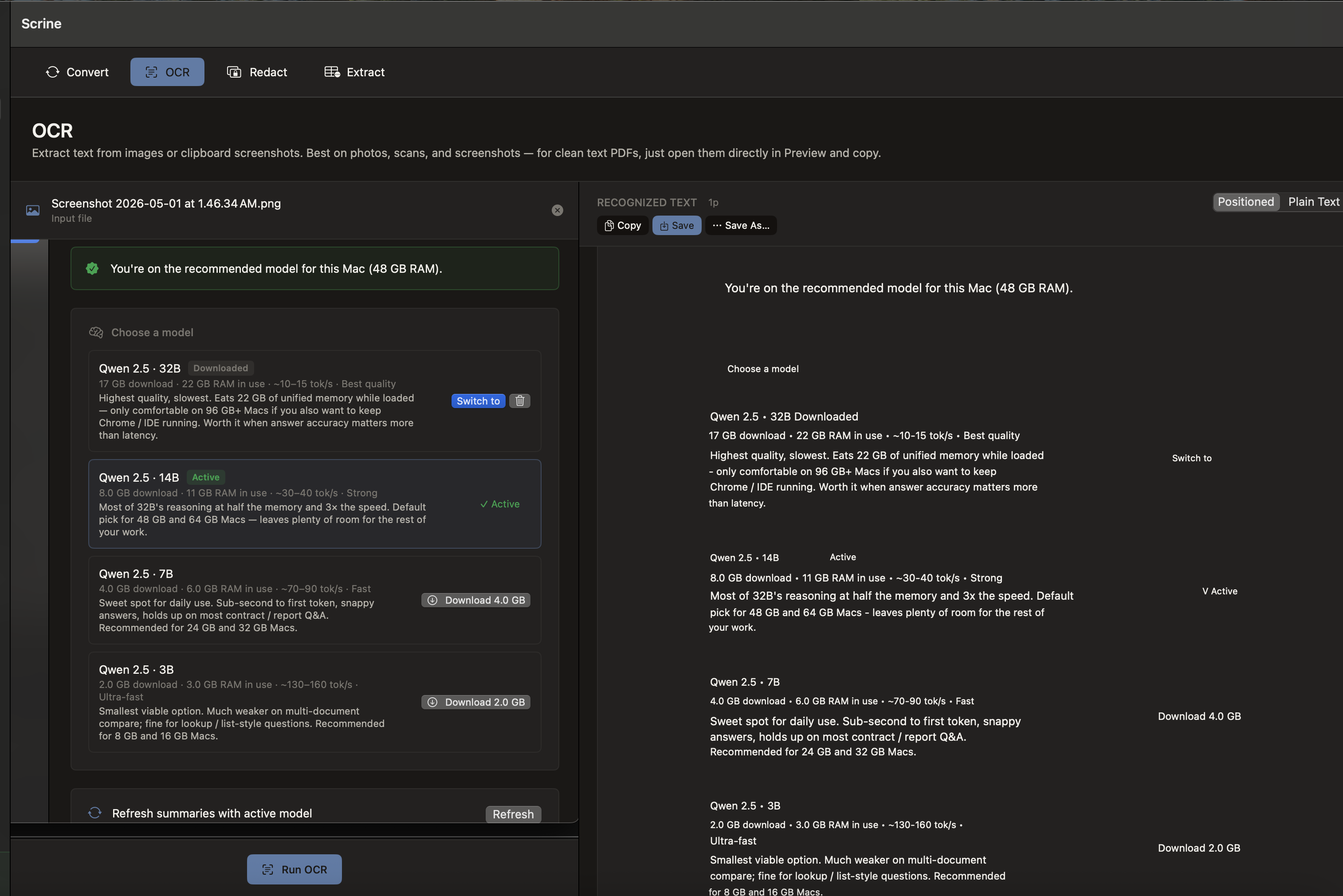
Scrine ships with a curated list of MLX-optimized 4-bit models — Qwen 2.5 (32B / 14B / 7B / 3B), Phi-4 14B, and Llama 3.1 8B — tagged by capability and tuned to your machine's memory.
One-click download. Models live in your local cache. Switch any time. Everything runs on Apple Silicon — the largest model on a 64GB Mac feels like a fast cloud API, except it's not on someone else's server.
One-time. Lifetime license for v1.x.
macOS 14+ · Apple Silicon (M1 / M2 / M3 / M4) · 16 GB RAM
Notarized + signed by Lynnx LLC. No "unverified developer" prompts.